To help support resolve the query quickly, have this ready:
- Your registered username and account email address.
- The exact date and timestamp of the cashout request.
- The transaction ID number, found under
Transaction History.
- The requested amount and the payment method used.
- A clear screenshot of your bank or e-wallet statement showing no incoming funds, if the cashier shows "approved" but nothing has arrived.
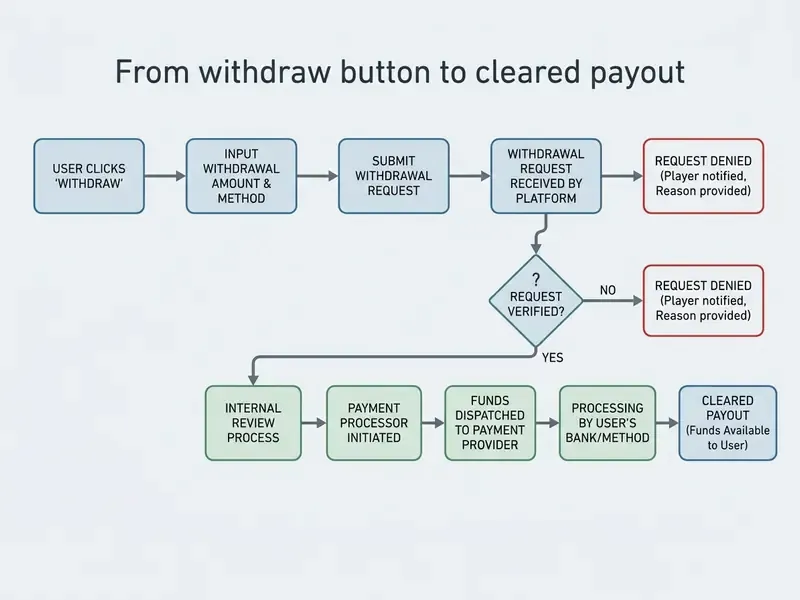
For missing deposits or uncredited payouts, the support team needs a clear transaction receipt or bank statement PDF displaying your full name, the date, the time, the exact currency amount and the transaction reference. Note where responsibility splits: the casino owns everything up to the moment the payment order is released, while the bank, card scheme, e-wallet or blockchain network owns settlement after that. Once a transfer has been processed externally, a reversal may not be possible.
Security alert: protecting your account and payment data
When dealing with support about a delayed payout, never share your account password, PIN codes, full 16-digit card numbers or e-wallet login credentials. Platincasino staff will never ask for your password. Submit identification and financial documents only through the secure upload portal under My Account -> Verifications, or through the official support channels listed on platincasino.com. Be wary of third-party phishing messages on social media or messaging apps pretending to represent Platincasino support. If you suspect your credentials have been exposed, change the password immediately and ring your bank's fraud department directly rather than through any link supplied in a message. That advice is consistent with the National Institute of Standards and Technology's phishing guidance (NIST, 2024), which stresses sharing sensitive information only through official, secure channels.